> ## Documentation Index
> Fetch the complete documentation index at: https://kosli-29-automate-helm-reference-updates.mintlify.site/llms.txt
> Use this file to discover all available pages before exploring further.
# Concepts
> Understand the main concepts behind Kosli
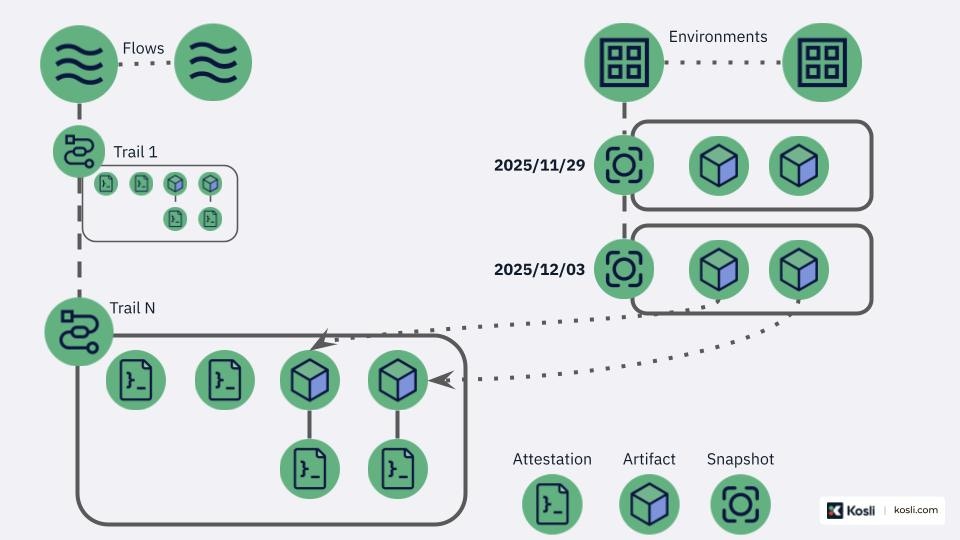
This section helps you understand the concepts Kosli is built on. The figure below gives an overview of the main Kosli concepts and how they are related to each other.
 ## Organization
A Kosli organization is an account that owns Kosli resources, such as Flows and Environments. Only members within an organization can access its resources.
When signing up for Kosli, a personal organization is automatically created for you, bearing your username. This personal organization is exclusively accessible to you. Additionally, you can create `Shared` organizations and invite multiple team members to collaborate on different Flows and Environments.
## Flow
A Kosli Flow represents a business or software process for which you want to track changes and monitor compliance.
As an example, a flow can be created to track the controls involved with building an application in your CI system.
### Trail
A Kosli Trail represents a single execution instance of a Kosli Flow.
Each Trail must have a unique identifier of your choice, based on your process and domain. Example identifiers include git commits or pull request numbers.
**Examples:**
* A CI run [example](https://app.kosli.com/cyber-dojo/flows/differ-ci/trails/98b393fa758558ceb90653a2cfb53ba3bd7898ee)
* A terraform workflow [example](https://app.kosli.com/cyber-dojo/flows/terraform-base-infra-prs/trails/PR-11)
* A cron job [in CI pipeline](https://github.com/cyber-dojo/live-snyk-scans/blob/2f0c74e65761b8d51271bb28de61db85b391d4f0/.github/workflows/snyk_scan_aws_prod.yml#L9) | [in Kosli](https://app.kosli.com/cyber-dojo/flows/aws-snyk-scan/trails/)
### Artifact
Kosli Artifacts represents the software artifacts generated from your CI pipeline.
Its creation is captured in Kosli through the trail.
When captured by Kosli, the Artifact is uniquely identified by its SHA256 fingerprint. Using this fingerprint, Kosli can link the creation of the Artifact with its runtime-related events, such as when the artifact starts or concludes execution within a specific Environment.
These artifacts play a crucial role in enabling **Binary Provenance**, providing a comprehensive chain of custody that records the origin, history and distribution of each artifact.
**Examples:**
* Artifact attestation as part of the CLI flow [example](https://app.kosli.com/kosli-public/flows/cli/trails/6781399)
### Attestation
An Attestation is a record of compliance checks or controls that have been performed a particular Artifact or Trail. It is normally reported after performing a specific risk control or quality check (e.g. running tests). The attestation encompasses the procedure's results.
Kosli provides specific built-in types of attestations (e.g., a snyk scan, sonar scan, junit tests) and allows to define your own custom types with jq quering for compliance status, or generic ones that simply creates an attestation without evaluation.
Attestations can be connected either to the trail, or to a specific artifact.
**Examples:**
* This build [in CI pipeline](https://app.kosli.com/api/v2/livedocs/cyber-dojo/yaml?ci=github\&command=kosli+attest+artifact) | [in Kosli](https://app.kosli.com/api/v2/livedocs/cyber-dojo/event?ci=github\&command=kosli+attest+artifact)
* This test execution [in CI pipeline](https://app.kosli.com/api/v2/livedocs/cyber-dojo/yaml?ci=github\&command=kosli+attest+junit) | [in Kosli](https://app.kosli.com/api/v2/livedocs/cyber-dojo/event?ci=github\&command=kosli+attest+junit)
* This security scan [in CI pipeline](https://app.kosli.com/api/v2/livedocs/cyber-dojo/yaml?ci=github\&command=kosli+attest+snyk) | [in Kosli](https://app.kosli.com/api/v2/livedocs/cyber-dojo/event?ci=github\&command=kosli+attest+snyk)
* This deployment approved [in CI pipeline](https://app.kosli.com/api/v2/livedocs/cyber-dojo/yaml?ci=github\&command=kosli+report+approval)
* This pull request [in CI pipeline](https://app.kosli.com/api/v2/livedocs/cyber-dojo/yaml?ci=github\&command=kosli+attest+pullrequest+github) | [in Kosli](https://app.kosli.com/api/v2/livedocs/cyber-dojo/event?ci=github\&command=kosli+attest+pullrequest+github)
### Evidence Vault
Attestations in Kosli have the capability to contain additional evidence files attached to them. This supporting evidence is securely stored within Kosli's evidence vault and is retrievable on demand.
## Audit package
During an audit process, Kosli enables you to download an audit package for a Trail, Artifact, or an individual Attestation. This package comprises a tar file containing metadata related to the selected resource, alongside any evidence files that have been attached. The audit package serves as a comprehensive collection of information aiding in audit-related investigations or reviews.
## Flow Template
A Flow Template defines the expected Artifacts and attestations for Trails of that given Flow to be considered compliant.
While each Flow has its own Template, each Trail in a Flow can override the Flow Template with its own.
**Examples:**
* Template for our CLI flow [example](https://app.kosli.com/kosli-public/flows/cli/settings/)
## Environment
Environments in Kosli monitor changes in your software runtime systems.
Each physical or virtual runtime environment you want to track in Kosli should have its own Kosli Environment created. Kosli allows you to portray your environments precisely. For instance, with a Kubernetes cluster, you can treat it as one Kosli Environment or designate one or more namespaces in the cluster as separate Kosli Environments.
Kosli supports various types of runtime environments:
* Kubernetes cluster (K8S)
* Amazon ECS
* Amazon S3
* Amazon Lambda
* Physical/virtual server
* Docker host
* Azure Web Apps and Function Apps
**Examples:**
* How this k8s cluster changes [example](https://app.kosli.com/cyber-dojo/environments/aws-prod/events/)
* How this lambda changes [example](https://app.kosli.com/kosli-public/environments/bitbucket-lambda-example-env/snapshots/)
### Environment Snapshot
An Environment Snapshot represents the reported status (running Artifacts) of your runtime environment at a specific point in time.
In each snapshot, Kosli links the running artifacts to the Flows and Trails that produced them. Snapshot compliance
relies on the compliance status of each running artifact against the environment's attached policies. Environment
compliance depends on its latest snapshot compliance. Environments without attached policies have an **unknown**
compliance state.
Running artifacts that come from 3rd party sources, can be `allow-listed` in an Environment to make them compliant.
**Examples:**
* The running artifacts in a AWS ECS namespace [example](https://app.kosli.com/cyber-dojo/environments/aws-prod/snapshots/)
* The running pods in a k8s cluster
* The terraform state files in an S3 bucket
* The functions in AWS Lambda
* The files in a directory
### Environment Policy
Environment Policy enables you to define and enforce compliance requirements for artifact deployments across different environments.
**Examples:**
* A policy making sure that all artifacts have the required tests associated with them [example](https://app.kosli.com/kosli-public/policies/all-test-cases-present)
## Organization
A Kosli organization is an account that owns Kosli resources, such as Flows and Environments. Only members within an organization can access its resources.
When signing up for Kosli, a personal organization is automatically created for you, bearing your username. This personal organization is exclusively accessible to you. Additionally, you can create `Shared` organizations and invite multiple team members to collaborate on different Flows and Environments.
## Flow
A Kosli Flow represents a business or software process for which you want to track changes and monitor compliance.
As an example, a flow can be created to track the controls involved with building an application in your CI system.
### Trail
A Kosli Trail represents a single execution instance of a Kosli Flow.
Each Trail must have a unique identifier of your choice, based on your process and domain. Example identifiers include git commits or pull request numbers.
**Examples:**
* A CI run [example](https://app.kosli.com/cyber-dojo/flows/differ-ci/trails/98b393fa758558ceb90653a2cfb53ba3bd7898ee)
* A terraform workflow [example](https://app.kosli.com/cyber-dojo/flows/terraform-base-infra-prs/trails/PR-11)
* A cron job [in CI pipeline](https://github.com/cyber-dojo/live-snyk-scans/blob/2f0c74e65761b8d51271bb28de61db85b391d4f0/.github/workflows/snyk_scan_aws_prod.yml#L9) | [in Kosli](https://app.kosli.com/cyber-dojo/flows/aws-snyk-scan/trails/)
### Artifact
Kosli Artifacts represents the software artifacts generated from your CI pipeline.
Its creation is captured in Kosli through the trail.
When captured by Kosli, the Artifact is uniquely identified by its SHA256 fingerprint. Using this fingerprint, Kosli can link the creation of the Artifact with its runtime-related events, such as when the artifact starts or concludes execution within a specific Environment.
These artifacts play a crucial role in enabling **Binary Provenance**, providing a comprehensive chain of custody that records the origin, history and distribution of each artifact.
**Examples:**
* Artifact attestation as part of the CLI flow [example](https://app.kosli.com/kosli-public/flows/cli/trails/6781399)
### Attestation
An Attestation is a record of compliance checks or controls that have been performed a particular Artifact or Trail. It is normally reported after performing a specific risk control or quality check (e.g. running tests). The attestation encompasses the procedure's results.
Kosli provides specific built-in types of attestations (e.g., a snyk scan, sonar scan, junit tests) and allows to define your own custom types with jq quering for compliance status, or generic ones that simply creates an attestation without evaluation.
Attestations can be connected either to the trail, or to a specific artifact.
**Examples:**
* This build [in CI pipeline](https://app.kosli.com/api/v2/livedocs/cyber-dojo/yaml?ci=github\&command=kosli+attest+artifact) | [in Kosli](https://app.kosli.com/api/v2/livedocs/cyber-dojo/event?ci=github\&command=kosli+attest+artifact)
* This test execution [in CI pipeline](https://app.kosli.com/api/v2/livedocs/cyber-dojo/yaml?ci=github\&command=kosli+attest+junit) | [in Kosli](https://app.kosli.com/api/v2/livedocs/cyber-dojo/event?ci=github\&command=kosli+attest+junit)
* This security scan [in CI pipeline](https://app.kosli.com/api/v2/livedocs/cyber-dojo/yaml?ci=github\&command=kosli+attest+snyk) | [in Kosli](https://app.kosli.com/api/v2/livedocs/cyber-dojo/event?ci=github\&command=kosli+attest+snyk)
* This deployment approved [in CI pipeline](https://app.kosli.com/api/v2/livedocs/cyber-dojo/yaml?ci=github\&command=kosli+report+approval)
* This pull request [in CI pipeline](https://app.kosli.com/api/v2/livedocs/cyber-dojo/yaml?ci=github\&command=kosli+attest+pullrequest+github) | [in Kosli](https://app.kosli.com/api/v2/livedocs/cyber-dojo/event?ci=github\&command=kosli+attest+pullrequest+github)
### Evidence Vault
Attestations in Kosli have the capability to contain additional evidence files attached to them. This supporting evidence is securely stored within Kosli's evidence vault and is retrievable on demand.
## Audit package
During an audit process, Kosli enables you to download an audit package for a Trail, Artifact, or an individual Attestation. This package comprises a tar file containing metadata related to the selected resource, alongside any evidence files that have been attached. The audit package serves as a comprehensive collection of information aiding in audit-related investigations or reviews.
## Flow Template
A Flow Template defines the expected Artifacts and attestations for Trails of that given Flow to be considered compliant.
While each Flow has its own Template, each Trail in a Flow can override the Flow Template with its own.
**Examples:**
* Template for our CLI flow [example](https://app.kosli.com/kosli-public/flows/cli/settings/)
## Environment
Environments in Kosli monitor changes in your software runtime systems.
Each physical or virtual runtime environment you want to track in Kosli should have its own Kosli Environment created. Kosli allows you to portray your environments precisely. For instance, with a Kubernetes cluster, you can treat it as one Kosli Environment or designate one or more namespaces in the cluster as separate Kosli Environments.
Kosli supports various types of runtime environments:
* Kubernetes cluster (K8S)
* Amazon ECS
* Amazon S3
* Amazon Lambda
* Physical/virtual server
* Docker host
* Azure Web Apps and Function Apps
**Examples:**
* How this k8s cluster changes [example](https://app.kosli.com/cyber-dojo/environments/aws-prod/events/)
* How this lambda changes [example](https://app.kosli.com/kosli-public/environments/bitbucket-lambda-example-env/snapshots/)
### Environment Snapshot
An Environment Snapshot represents the reported status (running Artifacts) of your runtime environment at a specific point in time.
In each snapshot, Kosli links the running artifacts to the Flows and Trails that produced them. Snapshot compliance
relies on the compliance status of each running artifact against the environment's attached policies. Environment
compliance depends on its latest snapshot compliance. Environments without attached policies have an **unknown**
compliance state.
Running artifacts that come from 3rd party sources, can be `allow-listed` in an Environment to make them compliant.
**Examples:**
* The running artifacts in a AWS ECS namespace [example](https://app.kosli.com/cyber-dojo/environments/aws-prod/snapshots/)
* The running pods in a k8s cluster
* The terraform state files in an S3 bucket
* The functions in AWS Lambda
* The files in a directory
### Environment Policy
Environment Policy enables you to define and enforce compliance requirements for artifact deployments across different environments.
**Examples:**
* A policy making sure that all artifacts have the required tests associated with them [example](https://app.kosli.com/kosli-public/policies/all-test-cases-present)